My converted EPUB has broken paragraphs and stray line breaks every few words
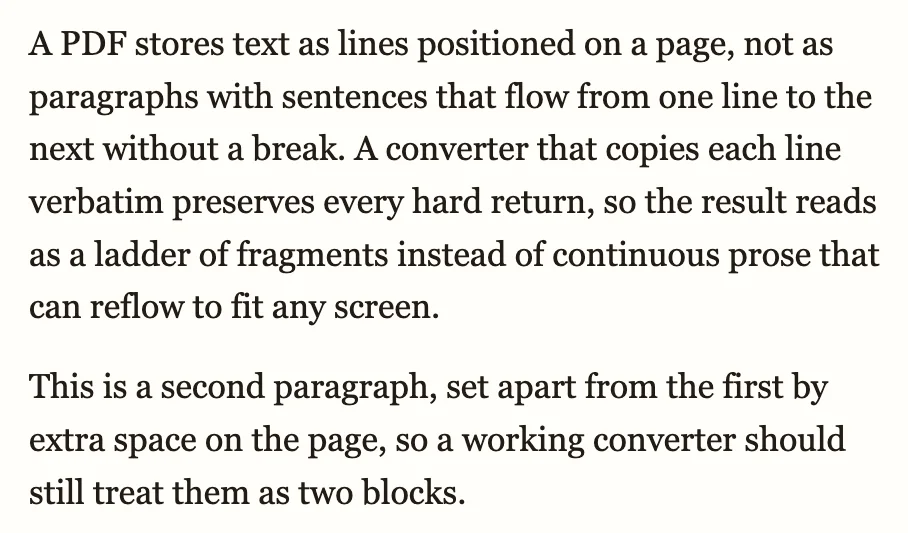
Your EPUB opens, but every sentence breaks into three short lines, and a hyphenated word such as “sentences” shows up as two fragments — “sen-” on one line, “tences” on the next. Below is a real conversion of the same demonstration passage, not a mockup: first as a converter without layout analysis renders it, then as ours does.
Convert your PDF to EPUB now
Upload a PDF and get a reflowable EPUB3 that keeps headings, footnotes, tables and images in reading order, so it resizes on any phone, tablet or e-reader. Preview the result before you decide.
Convert a PDF → See a converted paper →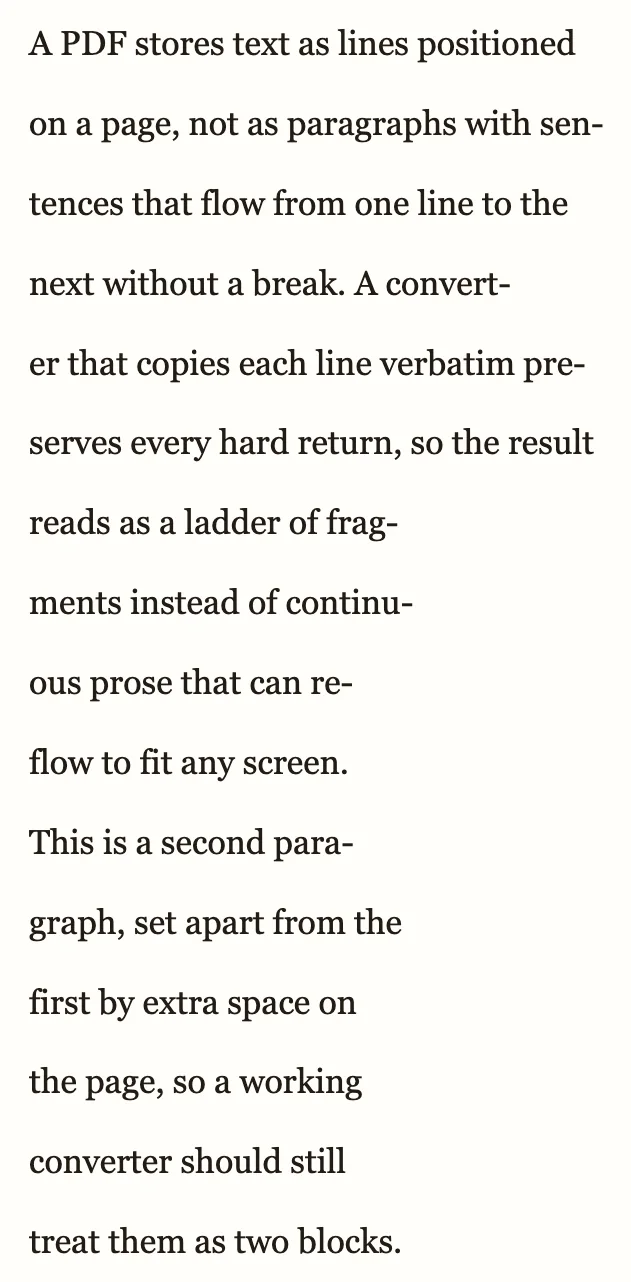 1
1
 2
3
2
3
- Line ends mid-word, before the hyphenated word is whole
- Hyphenated word repaired — whole, not split across lines
- Lines rejoined into one paragraph; the real paragraph break kept
Have the PDF? Convert it here →
Why this happens
A PDF stores individual lines positioned on a page, not paragraphs — a line ending is just where the typesetter happened to break it, sometimes mid-word with a hyphen. A converter that copies those lines verbatim keeps every one of those breaks, so when the reading app reflows the text to your screen, a new line starts every few words and hyphenated words stay cut in two. Ours rejoins paragraphs by reading where the PDF's own line breaks fall against the page margin, repairs hyphenation at those line endings, and keeps a true paragraph break — the extra space the author left between paragraphs — as its own block.
What to check in the preview
- Read a paragraph straight through — it should flow as one block, with no new line starting mid-sentence.
- Look for a hyphenated word that fell at a PDF line ending — it should read as one whole word, not two fragments.
- Check that an intentional paragraph break still shows as a break, not run into the paragraph before it.
How to get the clean version on toolkit.bot
- Open toolkit.bot and drop the same PDF you converted before — the first 50 pages convert and download free, no account needed.
- Check the preview: paragraphs should read as whole blocks, with hyphenated words rejoined.
- Download the EPUB, or sign in free for the whole file.
Convert the same PDF again — this time with whole paragraphs.
First 50 pages free, no account · whole file with a free account · $0.99 for a clean copy
Frequently asked questions
Why does my EPUB have a line break every few words after converting a PDF?
PDFs store individual lines positioned on a page, not paragraphs. A converter that copies those lines verbatim keeps every hard break, so the EPUB starts a new line at the same spot every time it reflows. Paragraph-aware conversion reads where those line breaks fall against the margin and rejoins them into continuous paragraphs.
Why are hyphenated words split in half in my EPUB?
A PDF sometimes breaks a word across a line ending with a hyphen, purely because of where that line happened to end on the page. A converter that copies lines verbatim keeps the hyphen and the split. Conversion that repairs hyphenation rejoins the word and drops the hyphen.
Will converting again lose my paragraph breaks?
No — a real paragraph break, the extra space the author left between paragraphs, is kept as its own block. Only the hard line breaks inside a paragraph are rejoined; a genuine new paragraph still starts a new one.
Related guides
- Two-column PDF reads across the page — when lines interleave from the wrong column entirely
- Footnotes and page numbers mixed into the text — when marginal elements land in the body
- Research papers to EPUB — the same paragraph and hyphenation fixes, for two-column academic PDFs